

The past couple months we turned our development attention to overhauling the way we store and present our Applied Hours - both in API's and Reporting. We've made several improvements to the way Applied Hours are calculated and returned through the Scout Systems API, giving customers more detailed production data and more flexibility when building reports or integrations.
The update includes expanded Applied Hours results, the addition of Job Status information, and an entirely new Station Applied Hours Breakdown API call.
More Detail Behind Applied Hours
Applied Hours results now provide greater visibility into where production time was spent by separating that time into:
- Setup Time – Time accumulated while a job is in Setup.
- Build Time – Time accumulated while a job is in Build.
- NVA Time – Non-Value Added time accumulated during other qualifying production states, including Pause, E-Stop, Unit Complete, Variant Selection, and Completed.
- Applied Hours – The total Applied Hours accumulated.
- Completed Units – The number of units completed.
This provides more context than a single Applied Hours value and makes it easier to use Scout production data for labor reporting, ERP integrations, dashboards, and other downstream analysis.
Work Order Applied Hours
We've expanded our existing Work Order Applied Hours GET (https://api.scout.systems/v1/workOrders/{id}/appliedhours) to include the Work Order's current Job Status.
Along with the Applied Hours accumulated by each operator, results can now identify the Work Order as:
- Active
- Suspended
- Completed
- Cancelled
This is particularly useful when a Work Order has accumulated production time but hasn't necessarily reached the end of its lifecycle.
For example, a Work Order may have accumulated Setup, Build, and NVA time before being suspended. That production activity still occurred and remains part of the Work Order's Applied Hours. The API can now return those hours while also identifying that the Work Order is currently suspended.
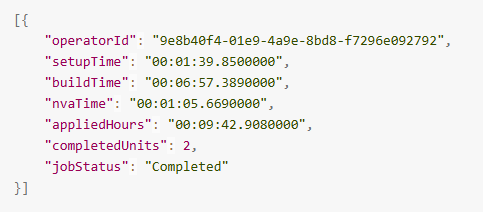
The Work Order Applied Hours call returns the Applied Hours accumulated thus far, without requiring a reporting date range.
Introducing Station Applied Hours Breakdown
For reporting across a specific period, we've added a new API call: Station Applied Hours Breakdown. (https://api.scout.systems/v1/stations/{stationId}/appliedhours-breakdown?StartDate={StartDate}&EndDate={EndDate}[&jobStatus])
Rather than returning only a Station's total Applied Hours, the new call returns the individual Work Orders that contributed Applied Hours during the requested date range, along with each Work Order's:
- Work Order ID
- Setup Time
- Build Time
- NVA Time
- Applied Hours
- Completed Units
- Current Job Status
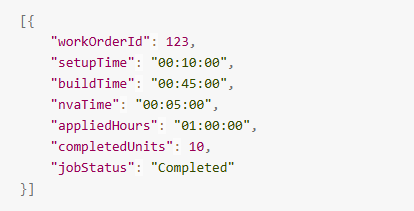
A Start Date and End Date define the reporting period, and an optional Job Status filter can be used to return only Active, Suspended, Completed, or Cancelled Work Orders.
Better Reporting Across Date Ranges
One of the more important changes behind this new call is how Scout determines which production activity belongs within the requested reporting period.
Production doesn't conveniently begin and end at the boundaries of a report.
A Work Order might begin before the requested Start Date and continue into the reporting period. Another might accumulate several hours of production during the period before being suspended and remain suspended well after the End Date.
The Station Applied Hours Breakdown evaluates the production activity that overlaps the requested date range and returns the applicable portion of those Applied Hours.
For example, imagine requesting a September report for a Station. A Work Order accumulated eight hours of production on September 10 before being suspended. October arrives, and that Work Order is still suspended.
Those eight hours still happened in September.
The Work Order can therefore appear in the September Applied Hours Breakdown as Suspended, with the applicable September production time included in its results.
This makes the reporting period about when the production activity actually occurred, rather than simply when a Work Order was eventually completed.
More Flexible Production Data
Together, these changes make Applied Hours considerably more useful through the Scout Systems API.
The Work Order Applied Hours call provides a detailed picture of everything accumulated on a specific Work Order thus far, including its current status.
The new Station Applied Hours Breakdown takes a different approach, providing the Work Orders and Applied Hours activity applicable to a specific Station and reporting period—with the option to filter those results by Job Status.
For customers connecting Scout Systems with an ERP, BI platform, custom dashboard, or other internal system, that means more detailed production data and greater control over how that data is analyzed and presented.
Other Notes:
- We're excited to announce that we've moved our operations to a larger warehouse/office, based in Kennewick, WA!
- We're also perhaps even more excited to announce that our Lead Developer (Jacob Fetner) welcomed his second child into the world last week! Yay!!